
Trucking Hub built a complete in-cab solution for fleets by bringing Samsung tablets, Mobile Device Management (MDM) and RAM® Mounts together into one dependable and upgradable system. Instead of piecing together hardware, software and support from different vendors, carriers receive tablets that arrive configured, securely mounted and ready for daily operations.

In this article, we explain the benefits of fleet tablets, the features carriers should expect from MDM, and why choosing the right tablet and mounting system matters more than many fleets realize. Not every tablet supports secure enterprise management, and not every mount is built to withstand daily use inside a truck.
Benefits of Managed Fleet Tablets
Faster Driver Onboarding
Many carriers hire drivers across the country without bringing them into the main terminal. With a managed fleet tablet, the carrier’s ELD, dispatch, navigation, communication and safety applications can be installed before the device ships. The driver receives a tablet that is already configured and ready to use. Carrier can also access the tablet remotely and walk through onboarding directly on the device.
Easier Driver Support
When a driver calls with a problem, the office should not have to guess what is happening on the screen. Carrier or Trucking Hub support can remotely view and control the tablet with the driver’s permission. This makes it easier to troubleshoot the ELD, navigation, dispatch application or device settings without requiring the driver to visit the office.
Better Control and Security
A managed tablet remains under the carrier’s control. The carrier decides which applications drivers can use, which settings they can change and how company information is protected. Tablets operate in kiosk or lockdown mode, limiting the device to approved work applications. If a tablet is lost, stolen or not returned, the carrier can lock or wipe it remotely.
More Reliable ELD Connectivity
Bluetooth ELDs depend on Bluetooth remaining active. Through MDM, carriers can prevent Bluetooth from bring turned off. This is a default setting for all Trucking Hub fleet tablets. If a driver disables it accidentally or intentionally, the tablet will automatically enforce the required setting and restore the ELD connection. This reduces avoidable logging interruptions and gives the carrier greater control over a setting that directly affects compliance.
GPS Tracking and Geofencing
Samsung tablets include built-in GPS that can be used through Trucking Hub Device Manager for location tracking and geofencing. This is especially useful for carriers using an ELD that is not integrated with Trucking Hub. The fleet can keep its existing ELD while using the tablet to provide truck visibility and geofence activity. The tablet can also serve as a secondary location source alongside an ELD or dedicated GPS tracker.
One Device for the Driver
A properly configured fleet tablet can give the driver one place to:
A Digital Roadside Folder
Trucking Hub Cloud Drive gives fleets a digital roadside folder that drivers can access directly from the tablet.
Carriers can make the following documents available:
When the office updates a file, the new version becomes available to the driver immediately. This reduces the need to mail replacement paper folders to every truck and helps prevent drivers from presenting outdated documents during an inspection.
Mobile Device Management (MDM)
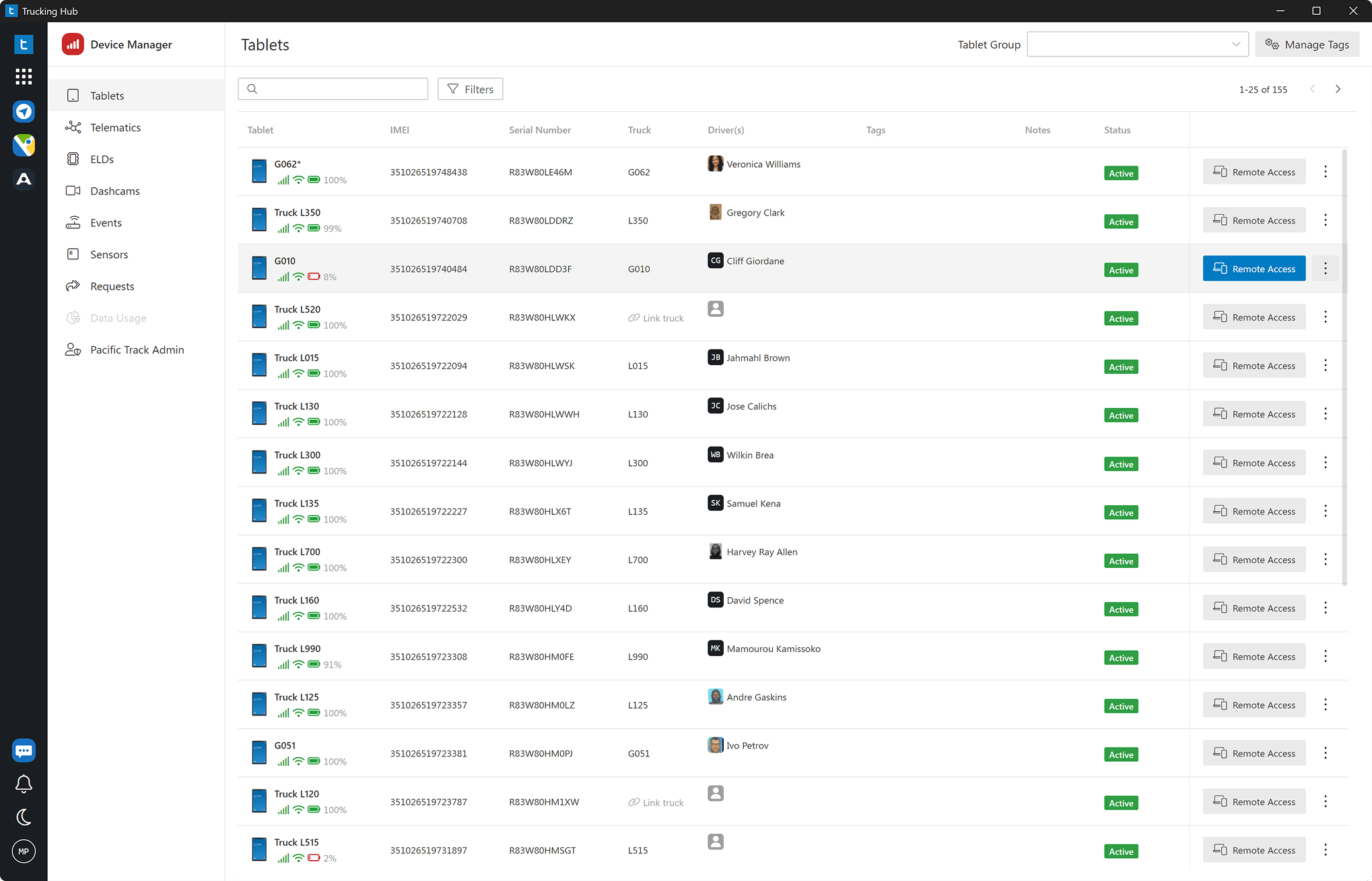
Trucking Hub Device Manager gives carriers centralized control over every company-owned tablet.
Preconfigured Carrier Profiles
Each carrier receives its own device profile. Before the tablet ships, Trucking Hub can install approved applications, apply security policies and configure the device for the carrier’s operation. The driver turns on the tablet and sees the tools selected by the carrier.
Application Management
Applications can be installed, updated or removed remotely. This allows carriers to deploy new software across the fleet without asking every driver to download or configure it individually.
Kiosk / Lockdown Mode
Carriers can control which applications appear on the tablet and prevent drivers from installing personal apps or changing protected settings. The tablet remains focused on the work it was purchased to perform.
Remote Access and Control
Authorized users can remotely view and control the tablet. This supports remote onboarding, training and troubleshooting while reducing downtime and support calls.
Remote Security Controls
Carriers can lock, reset or wipe managed tablets when necessary. This helps protect load information, customer data, company documents and other business information stored on the device.
Bluetooth Policy Enforcement
Bluetooth settings can be managed remotely to help maintain the connection between the tablet and the ELD. If Bluetooth is turned off, the carrier’s device policy can automatically turn it back on.
Location Tracking and Geofencing
The tablet’s built-in GPS can provide device location and geofence activity through Trucking Hub. This gives carriers an additional source of visibility without requiring them to replace their current ELD platform.
Audible Device Alarm
An audible alarm can be activated remotely to help locate a misplaced tablet or get the driver’s attention during an urgent situation.
Why Samsung Tablets
Trucking Hub uses the Samsung Galaxy Tab A9 because Samsung Knox provides the enterprise security and management capabilities needed for a professional fleet deployment. Its 8.7-inch display also offers the right balance for in-cab use, providing enough screen space for HOS, dispatch and navigation without creating an oversized, overly bright display at night. Larger tablets can be distracting inside a dark cab, which is why many drivers prefer the more compact 8.7-inch size.
Samsung Knox supports:
This allows the tablet to operate as a controlled company device rather than an unrestricted consumer tablet.
Not every Android tablet supports this level of management. A lower-cost device may look similar on paper but lack the security, enrollment and policy controls required to manage hundreds or thousands of tablets reliably. In our own deployments, Samsung tablets have also proven dependable at maintaining an always-on Bluetooth connection with ELD hardware, which is critical when drivers rely on the tablet to record and display Hours of Service.
Samsung also provides a dependable product line with a clear upgrade path. Trucking Hub is already preparing to transition from the Galaxy Tab A9 to the Galaxy Tab A11, the next model in Samsung’s 8.7-inch tablet lineup. Because the Tab A11 retains the same 8.7-inch screen size, we expect the transition to require minimal changes, although we will test and confirm the tablet, software, skin, dock and charging configuration before offering it to fleets.
Why RAM® Mounts
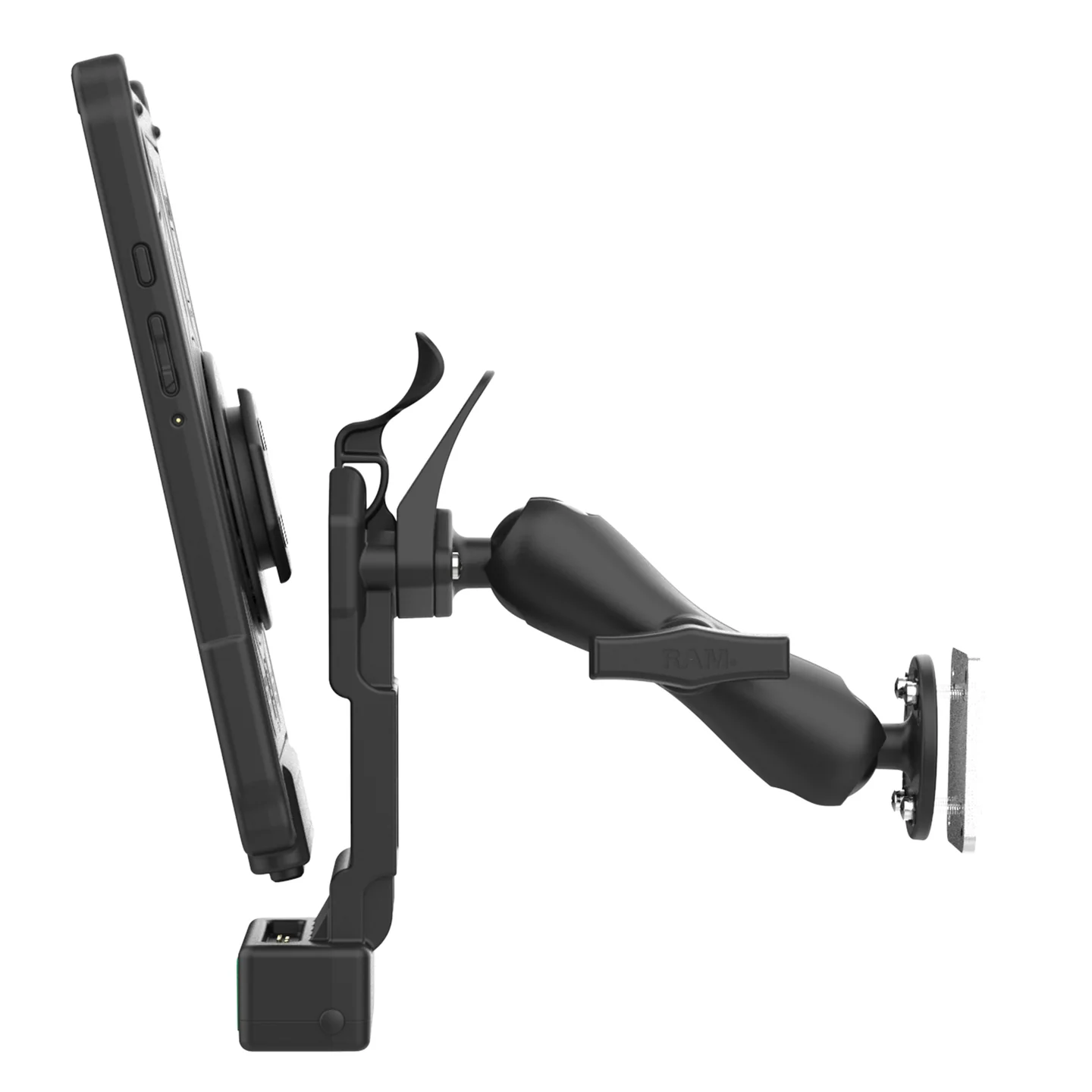
The mounting and charging system is just as important as the tablet.
RAM® Mounts are built for demanding vehicle environments where equipment must remain secure, powered and accessible. Its mounting systems are used in public safety, emergency response and other industries where ordinary consumer mounts are not dependable enough.
The RAM® Mount bundle for the Samsung Galaxy Tab A9 includes:
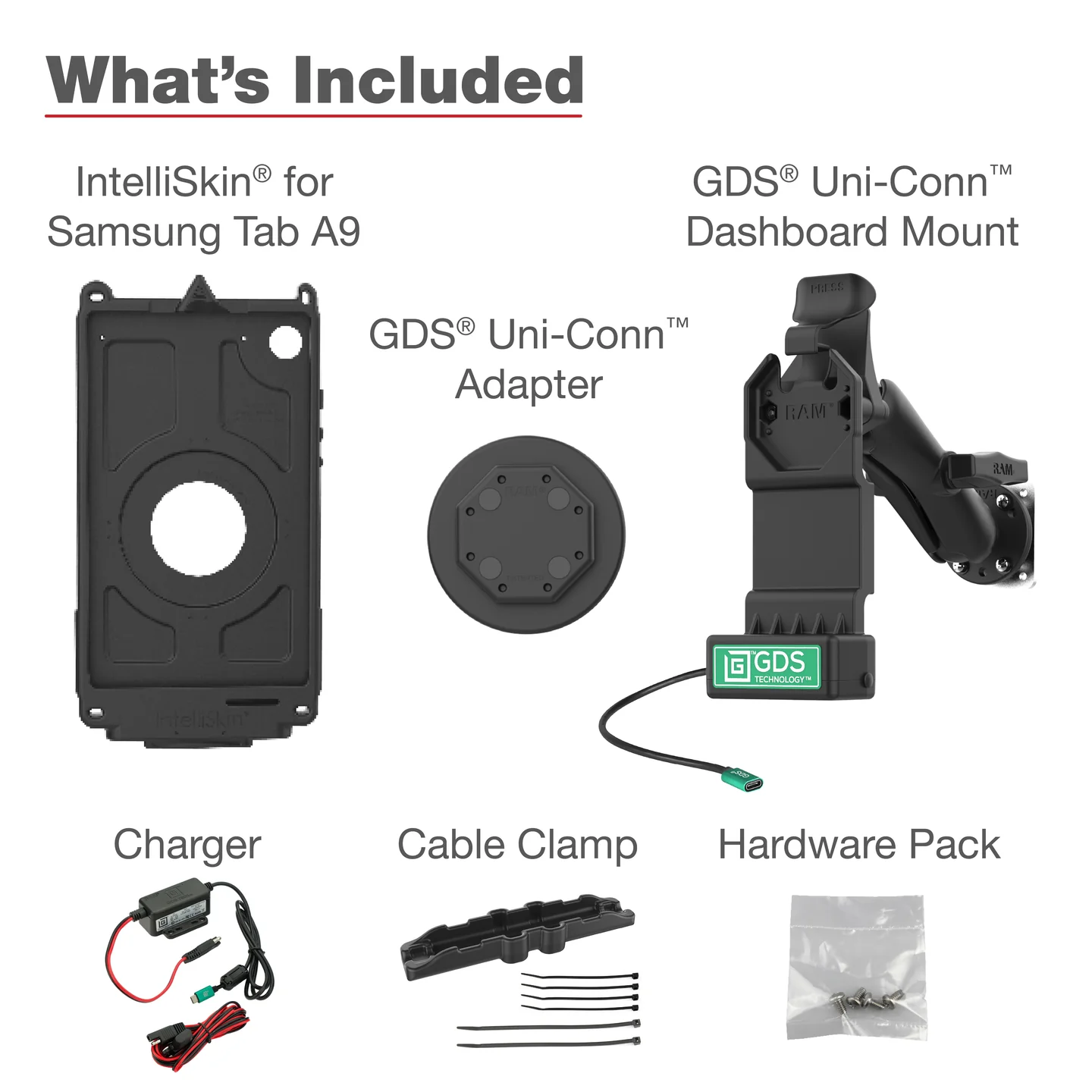
The system keeps the tablet secure, powered and positioned for safe, convenient use. Trucking Hub has sold more than 15,000 RAM® mount bundles over the years with no material complaints, making it a proven in-cab solution trusted by trucking companies that use it every day.
Protecting the Charging Port
Repeatedly plugging a cable into a tablet can damage the USB-C port, especially when truck vibration constantly moves the connector.
The RAM® GDS® skin connects to the tablet once. After that, the tablet charges through contact pins when placed in the powered dock.
This reduces wear on the charging port, provides a more stable power connection and helps protect the tablet from drops and daily handling.
Locking Dock Options
RAM® also offers locking docks for carriers that do not want the tablet removed from the truck.
A locked tablet with continuous power and cellular connectivity can provide a dependable primary or secondary tracking source.
Easier Future Upgrades
The RAM® GDS® system is modular, so fleets can often upgrade to a compatible newer Samsung tablet by replacing only the device-specific skin while keeping the dock, mount, backing plate and vehicle installation in place. This protects the initial investment and makes it more cost-effective to keep the fleet’s in-cab setup modern.
Trucking Hub is already preparing for the Galaxy Tab A11, the 8.7-inch successor to the Galaxy Tab A9, and will validate the complete hardware and software setup before deployment.
Properly Mounted for HOS and Navigation
A portable device used as an ELD display must be mounted in a fixed position while the commercial vehicle is operating and visible to the driver from the normal seated position.
A properly installed RAM® Mount provides a stable display for Hours of Service, dispatch and truck navigation.
The Trucking Hub mobile app includes integrated CoPilot Truck Navigation. When drivers receive a dispatch, they can open a stop and begin turn-by-turn truck navigation directly from the load.
The same mounted device can be used for HOS, dispatch, navigation, document scanning and communication with the office.
Why Verizon Connectivity
A fleet tablet depends on consistent connectivity for dispatch, navigation, ELD communication, GPS tracking, app updates and remote support. When service drops, both the driver and the back office lose access to tools they rely on throughout the day.
That is why Trucking Hub uses Verizon, the nation’s largest and most reliable wireless network. Its broad nationwide coverage helps drivers remain connected to dispatch and support, giving them greater peace of mind wherever they operate.
Running on Verizon costs more than using a lower-cost network, but the small price difference is outweighed by stronger coverage and reliability. In trucking, dependable communication, location visibility and fleet control matter more than saving a few dollars on a monthly data plan.
Explore Trucking Hub's data plans to find the right option for your operation or contact us for a tailored solution.
Why Trucking Hub
Trucking Hub does more than sell tablets. We manage the complete fleet tablet lifecycle, from deployment and MDM enrollment to support, replacement parts and future upgrades.
Since 2017, we have helped trucking fleets simplify managed tablet deployments, with more than 20,000 tablets sold. Fleets can purchase a complete preconfigured in-cab solution or use compatible tablets they already own. Our team can remotely enroll existing devices into Trucking Hub Device Manager, install approved applications and apply the carrier’s security, kiosk and device policies.
We stock tablets, RAM® docks, mounts, chargers and replacement parts by the hundreds, including components for older tablet and mounting systems. This allows fleets to deploy, expand, repair or modernize their in-cab setup without starting over. In-stock orders can be configured and shipped the same day.
Carriers receive one long-term partner for:
Volume pricing is available for larger deployments, and complete solutions are backed by a money-back guarantee. We also handle applicable manufacturer warranties in-house, helping carriers receive replacement equipment quickly and without unnecessary hassle.
The Complete In-Cab Solution
Trucking Hub brings it all together, so you don't need five vendors to get one tablet working reliably in a truck. Samsung provides the enterprise-grade device. RAM® provides the mount and charging system built to survive a truck cab. Trucking Hub manages the rest: MDM, connectivity, deployment and support.
Thousands of carriers rely on our solution every day. It is also the same in-cab setup we use in our own fleet, refined through years of real-world trucking operations. We believe it is the most complete in-cab solution available to trucking companies.
Frequently Asked Questions
Can the tablet work with our existing ELD?
Yes. Trucking Hub can install and manage the carrier’s approved ELD application. If the ELD is not integrated with Trucking Hub, the tablet can still provide GPS tracking and geofencing through Device Manager.
Does the tablet arrive ready to use?
Yes. Tablets can be shipped with the carrier’s applications, device profile and security policies already installed.
Can drivers install or remove applications?
The carrier controls which applications are available. Lockdown mode prevents drivers from installing unauthorized apps or changing protected settings.
What happens if a tablet is lost or not returned?
The carrier can remotely lock or wipe the managed device to protect company data.
Can the tablet be permanently installed?
Yes. RAM® offers powered and lockable docking options that can prevent unauthorized removal from the truck.
Can carrier staff help drivers remotely?
Yes. Carrier can remotely view and control the tablet for onboarding, training and troubleshooting.